Reading your child's report
What is in a published report, what the scores mean, and how to mark it read or add a note.
For families, players
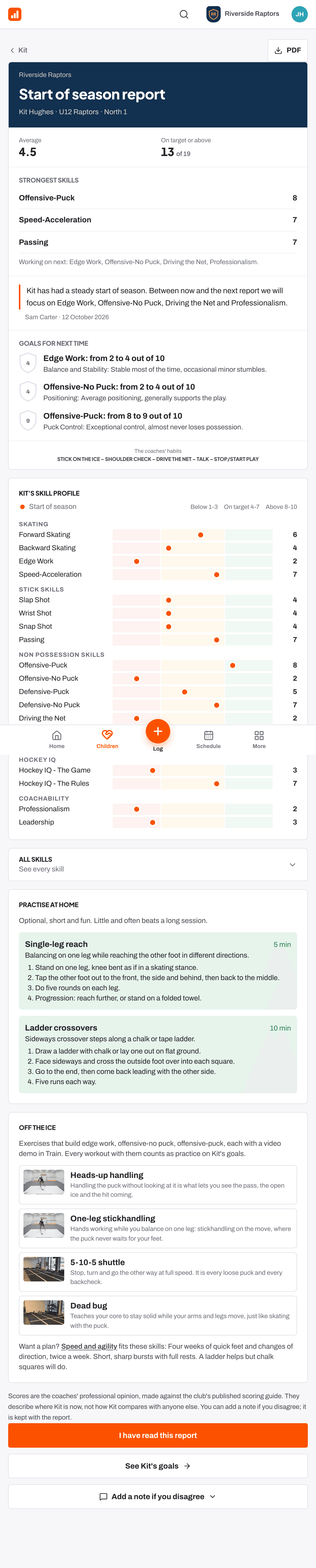
Your child is scored three times a season: at the start, middle and end. After each skills check the coaches write feedback, then a head coach or club admin publishes the report to you. You get an email and a Read button in Up next.
What the report shows
- Average, the Change since the last skills check, and how many skills are On target or above.
- The biggest gains, or the strongest skills, with the coaches' words.
- What the goals did: how the last goals went.
- Goals for next time: the new goals.
- The coaches' habits: what the club asks every player to work on.
- All skills: open See every skill for each score with the coaches' note.
- In games this season, where the club records game stats. Development comes first: stats are one small part of the picture.
- Practise at home and Off the ice: short, optional ideas.
Reading the scores
Every skill is scored from 1 to 10 against written descriptions. 1 to 3 is Developing, 4 to 7 is On target and 8 to 10 is Strong, and the right score depends on age. A skill marked Not seen enough means the coach did not see enough of it to judge. It never counts as a low score and is left out of the average. What the scores mean in More shows what each level looks like.
Mark it read, or add a note
- Press I have read this report. The coaches can see that you have read it.
- If you disagree with something, open Add a note if you disagree, write your note and press Save note. It is kept with the report and the coaches are told. It does not change the scores.
- Press See [child]'s goals to go to the new goals.
- Your child's goals Help article
- Your family home page: This week Help article
- The 1 to 10 scale and the three bands Help article
- When you have not seen enough to score Help article
Still stuck? Email hello@rinktracker.com and we'll help.