Saying if your child can come
How to answer for training, games and events, add a note for the coach, and choose which emails you get.
For families, players
Coaches plan sessions, lines and numbers around your answers, so it helps to answer each event as soon as you know.
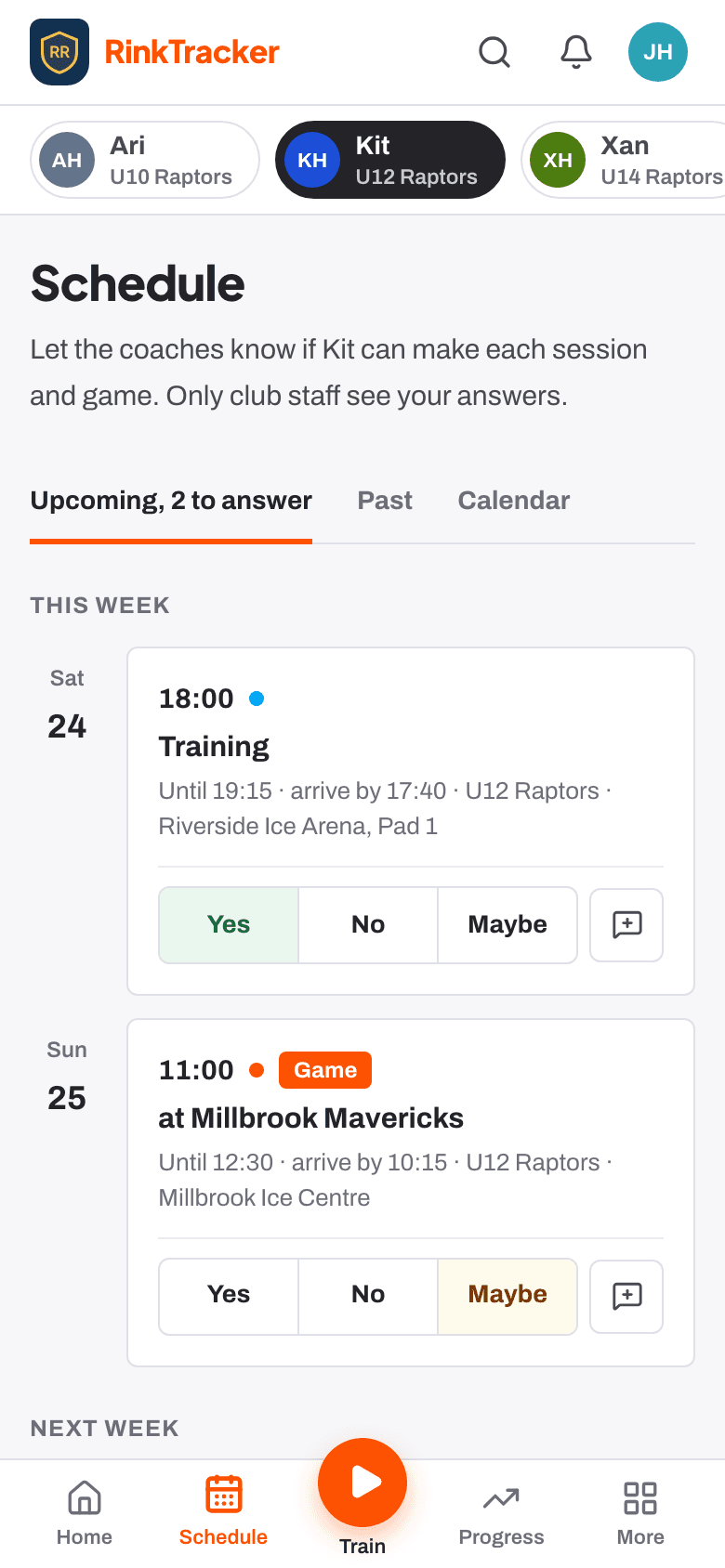
Answer an event
- Open Schedule, or answer straight from Coming up on Home.
- For each event, choose Yes, No or Maybe for your child. With more than one child, each child has their own buttons.
- If there is something the coach should know, press Add a note for the coach, for example that your child is arriving 10 minutes late.
You can change an answer later if plans change. The event page shows the times, where it is, when to arrive and any notes for families.
Emails about the schedule
- New sessions and games to answer.
- A reminder two days before, if you have not answered.
- Changes of time or place, cancellations, and events that are back on.
To stop these, use Training and game emails at the bottom of the Schedule page. New events still show in RinkTracker if you turn the emails off.
Related
- Your family home page: This week Help article
- Who's coming: availability replies Help article
- Notifications, emails and turning them off Help article
Still stuck? Email hello@rinktracker.com and we'll help.