Your family home page: This week
What you see when you sign in as a parent or guardian: one child at a time, the next thing to do, what's coming up and how the week is going.
For families
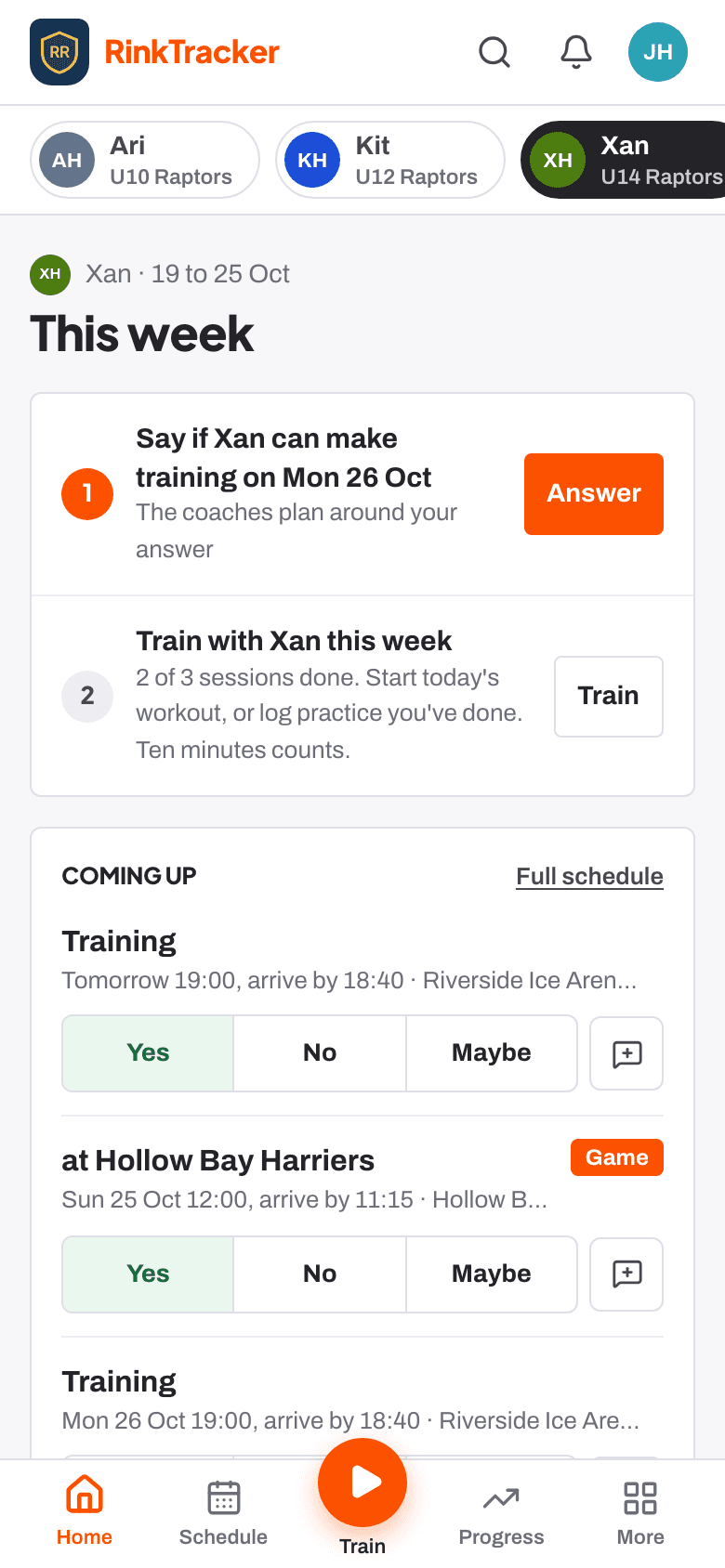
When you sign in, Home opens on This week for one child. If you have more than one child at the club, the names along the top switch between them, and every page follows the child you choose. Your phone remembers the choice.
The next thing to do
At the top are at most three things the club would like from you, most useful first, each with one button:
- Train with [child] this week: sessions done against the club's weekly target, with Train.
- Reply to the coach's video review, when a coach has sent one.
- See what the coaches said: a new report or goal review.
Further down the page
- Coming up: training and games, each with Yes, No or Maybe and room for a note to the coach.
- Progress this week: practice and workouts so far, with no streaks and nothing marked as missed.
- Also: a new report for another child, an announcement, or the club's guide to what the scores mean.
Finding your way round
The menu has Home, Schedule, Progress and More, and an orange Train button: in the middle of the bottom bar on a phone, at the top right on a laptop. Train shows the one workout to do next with Start, and Log practice for practice done away from the app. Under More you'll find medical details and contacts, privacy and consent, notifications and reporting a safeguarding concern.
- Your child's goals Help article
- Saying if your child can come Help article
- Reading your child's report Help article
- Your first week as a family Step-by-step guide
Still stuck? Email hello@rinktracker.com and we'll help.