Assessment windows: start, mid and end of season
Each season has three skills checks, and coaches score players while a window is open.
For coaches, club admins
Coaches score every player three times a season: at the start, the middle and the end. Each of these is an assessment window, with an opening and closing date. The windows are called Start of season, Mid-season and End of season.
Scoring three times on the same scale shows how a player has moved, and each window ends in a report for the family.
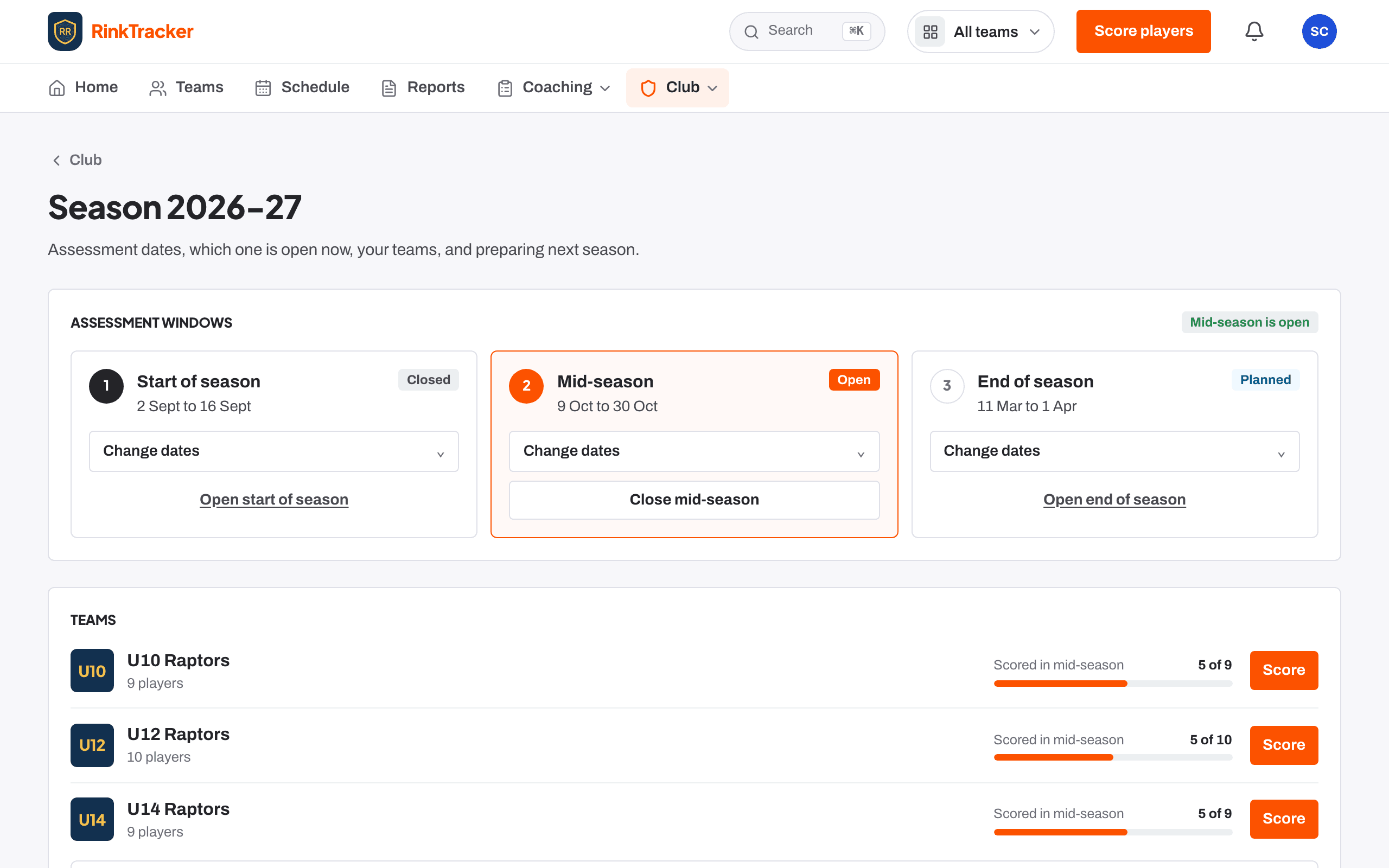
Opening and closing a window
Windows live on the Season page, which you reach from Club. Any staff member can look. Club admins and head coaches can change the dates and open or close a window.
- Open Club, then Season.
- To move the dates, press Change dates, set Opens and Closes, then Save dates.
- To start scoring early, press the open button on that window, for example Open Mid-season. To finish, press its close button.
A planned window opens by itself on its opening date. Only one window is open at a time.
If a window is still open after its closing date, Home shows Close the … assessment for club admins and head coaches as a reminder.
While a window is open
The Score players and One skill buttons appear on the team page, and Score in the bottom menu on a phone takes you to the sheet. Each team card on Teams shows how many players are scored.
- Scoring a player at the boards Help article
- The 1 to 10 scale and the three bands Help article
- Run a skills check Step-by-step guide
Still stuck? Email hello@rinktracker.com and we'll help.