Scoring one skill for the whole team
Score every player on one skill in a single list, starting from last window's scores.
For coaches
If you run a drill that shows one skill clearly, it is often quicker to score that skill for everyone at once. Score one skill for everyone shows every player as a row.
- On Teams, press Score one skill for everyone. On a team page, press One skill.
- Pick the skill from the list (on a phone, from the drop-down).
- Filter to All, Forwards or Defence if you only ran the drill with some players.
- Score each row, then move to the next skill.
On a phone
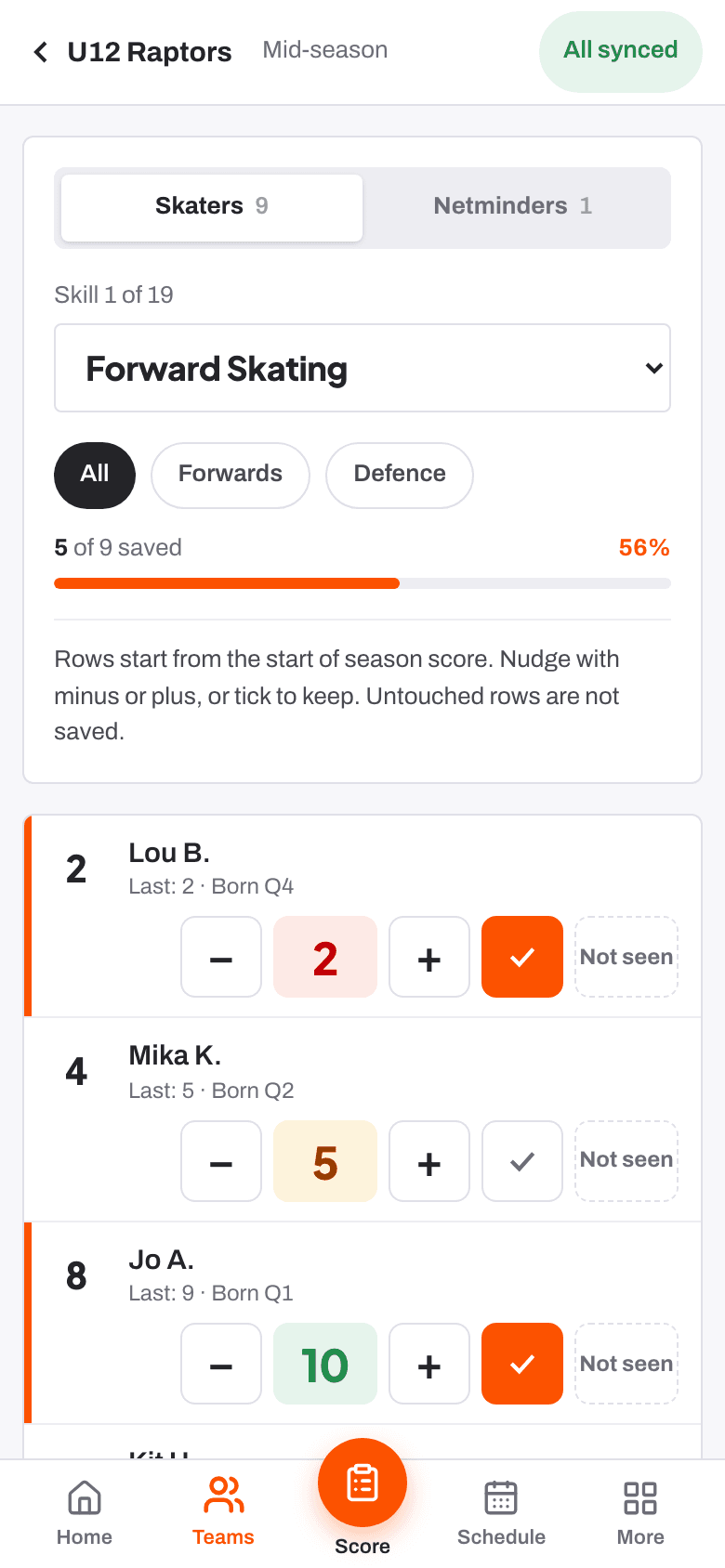
Each row starts from the player's score in the previous window. Use minus or plus to nudge it, or press the tick to keep it as it is. Press Not seen if you did not see that player do it.
On a larger screen
Each row shows all ten scores. Click one to save it. The outlined score is where the row starts.
Saving
Every change saves straight away. Rows you do not touch are not saved, so nothing is recorded for a player you skip. The bar at the top shows how many players are saved for that skill.
When every row is done, choose the next skill, Draft feedback or Back to the team.
Netminders are scored on each part of a skill, so their skills are listed by part.
- Scoring a player at the boards Help article
- When you have not seen enough to score Help article
- Score one skill for everyone Step-by-step guide
Still stuck? Email hello@rinktracker.com and we'll help.