Designing a drill
Draw a drill on the rink with players, pucks and routes, animate it step by step, and link it to skills.
For coaches
The designer is a full-screen rink for drawing your own drills. Club admins, head coaches and coaches can open it with Design a drill on Home or the Drills page.
Starting
Start a drill offers a fresh rink (Full ice, Half ice or One zone), Stations for three to six groups, or a starting point: a lineup, an animated starter, a drill from the library, or one of your club's own drills to copy.
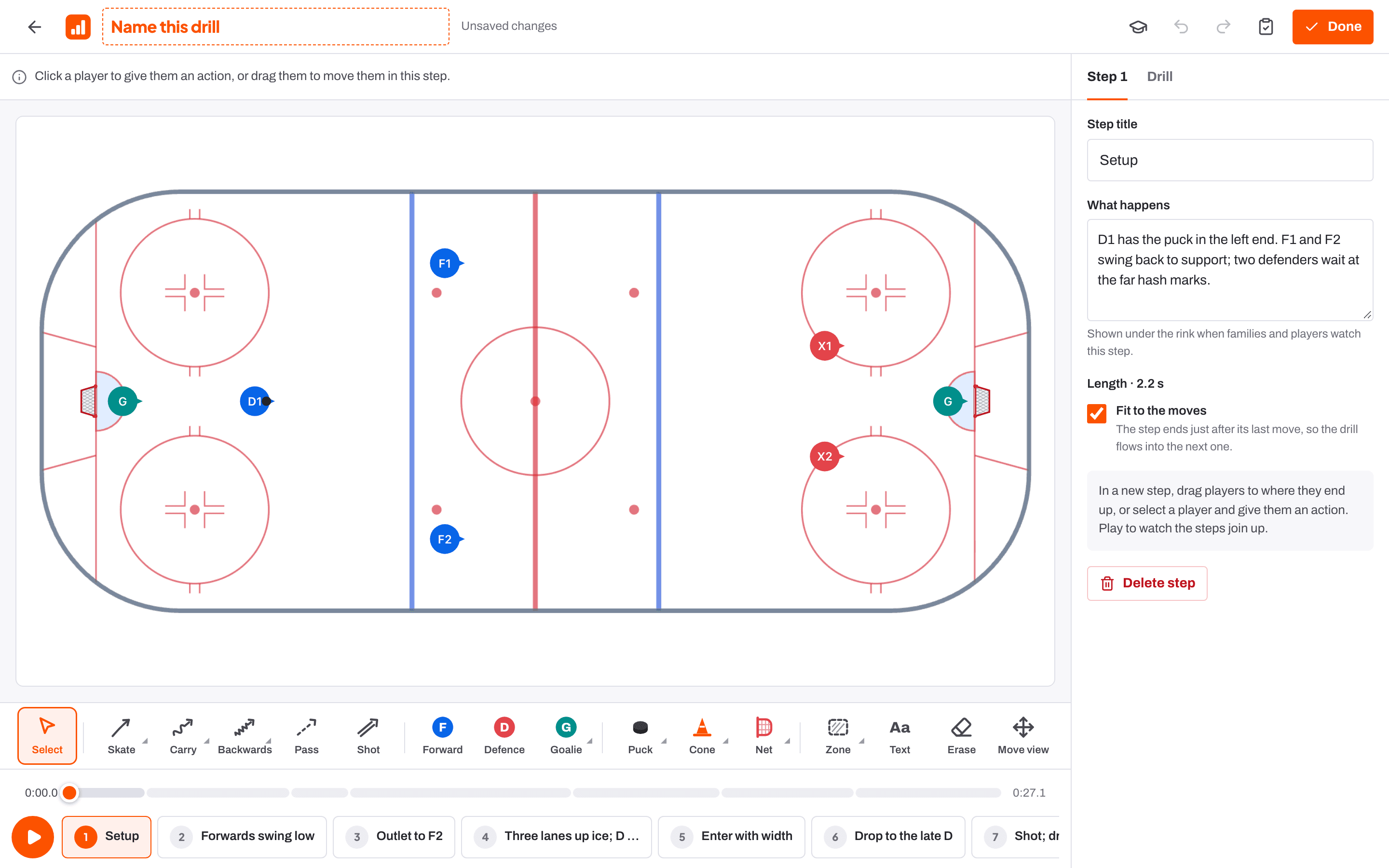
Drawing it
- Moves: Skate (also to a stop, with crossovers, or crossovers to a stop), Carry (or carry to a stop), Backwards (to a stop, or with the puck), Pass and Shot.
- People: Forward, Defence, Goalie and Coach.
- Kit: Puck or a pile of pucks; Cone, numbered cone, tyre, ladder, stick or divider; Net, mini net or rebounder.
- Drawing: Zone, zone box, circle, box, arrow, line, dashed line, freehand, stop, tight turn, pivot and screen, plus Text and Erase.
- Tools with variants open when you hover over them, or press and hold on a touch screen. A pass can go direct, bank off the top or bottom boards, or rim either way.
- Click a player for their next action: Skate, Carry, Backwards, Pass, Shot, Wait, Drop, Collect or Duplicate. Copy and paste work too.
Steps
Press Add step to build the drill up. Each step has a Step title and What happens, which is shown under the rink when families and players watch that step. Fit to the moves ends a step just after its last move; turn it off to set the length yourself, up to 20 seconds. The Drill timeline under the rink scrubs through the whole drill.
Passing on the move
A pass can leave partway along the passer's skating route. Select the pass and an orange Pass here marker appears on the passer's route: drag it to where the pass should happen, or use Released in the movement panel. The pass leads the receiver to where they'll be, and both players keep skating to the end of the lines you drew. Tick At the end of the route to pass once the route is finished. Drops and dumps work the same way.
PDF or image on the drill page makes a printable sheet with a rink for every step: Print or save as PDF, or Download image.
Details
In the details sheet set the rink view, What to look for, age groups, Make it easier and Make it harder, and Skills it develops. Linked skills let coaches suggest the drill for players' goals. Mirror the drill flips it to the other side.
Check the play reviews the drill for pace, actions that overlap, and passes that may not be received.
| Ctrl or Cmd + Z | Undo |
| Shift + Ctrl or Cmd + Z | Redo |
| Esc | Cancel what you are placing and go back to Select |
| Delete or Backspace | Delete what is selected |
| Arrow keys on the timeline | Move 0.1 s (1 s with Shift); Page Up and Page Down jump between steps |
- The drill library Help article
- Session plans and the bench runner Help article
- Plan a training session Step-by-step guide
Still stuck? Email hello@rinktracker.com and we'll help.